Open source · Ultralytics YOLO

YOLO detection and model comparison,
from one CLI.

  • Pick from multiple trained models — organize weights in folders like cars/ or receipts/ and select the exact .pt file to run.
  • Batch-detect your dataset — process every image in dataset/ and export bounding-box visuals plus standard YOLO annotation files.
  • Compare models side by side — evaluate Precision, Recall, mAP50, and mAP50-95 in a CSV report you can open in Excel.
Supervised AI Learner main interface for model selection and detection

How it works

Three steps from model to results

A guided CLI workflow: choose detection or comparison, pick your model folder, then let the engine process your dataset or validation set.

  1. Feature selection

    Choose Process Images (Detection) to run object detection on your dataset, or Compare Models to benchmark every .pt file in a folder against validation data.

  2. Model folder selection

    Select the model folder (e.g. cars or receipts) containing your trained weights and a classes.txt file. Classes load automatically—no manual YAML editing for detection runs.

  3. Processing

    Detection: pick a specific model file, process all images in dataset/, and write results under output/. Comparison: the system finds all models, builds a comparer dataset, evaluates each on validation data, and saves model_comparison.csv.

Two main features

Detection or model comparison

One entry point (python main.py), two powerful paths depending on whether you need labeled images or performance metrics.

Process Images (Detection)

Select a model file such as best1.pt. The engine loads weights and classes, runs YOLO on every image in dataset/, and writes annotated images, YOLO label files, and optional output video.
Compare Models

Automatically discovers every model in the selected folder, creates a comparer validation structure, evaluates each checkpoint, and exports a CSV with Precision, Recall, mAP50, and mAP50-95 for easy analysis.

Features

Built for YOLO workflows end to end

Everything from the Supervised AI Learner README—dynamic model folders, structured output, and standard YOLO artifacts.

Dynamic model selection

Choose from multiple model folders and individual .pt files without hard-coding paths in the codebase.

Automatic image detection

Process images with your selected YOLO model and draw detections with confidence scores, color-coded by class.

Model comparison

Compare performance of multiple trained models on the same validation data and rank them with standard detection metrics.

Organized output

All results land in a consistent output/ tree—saved images, labels, video, and comparison reports.

Video generation

Stitch detection frames into output_video.mp4 so you can review batch runs visually.

Dynamic class loading

Reads classes.txt from each model folder and configures detection classes automatically.

YOLO format support

Generates standard YOLO annotation files with normalized coordinates ready for training pipelines.

Screens · Main interface

Choose models and launch detection from one menu

The interactive CLI is your control center—pick detection or model comparison, browse folders under models/, and select the exact weight file before processing starts.

Run python main.py and follow numbered prompts. The menu lists every model folder and .pt checkpoint so you never edit paths by hand.

  • Step 1: Process Images or Compare Models
  • Step 2: Select a folder such as cars/ or receipts/
  • Step 3: Pick best1.pt (detection) or run all models (comparison)
  • classes.txt loads automatically from the model folder
Main interface for selecting models and running detection

Screens · Precision and accuracy

See how well your model detects before you ship it

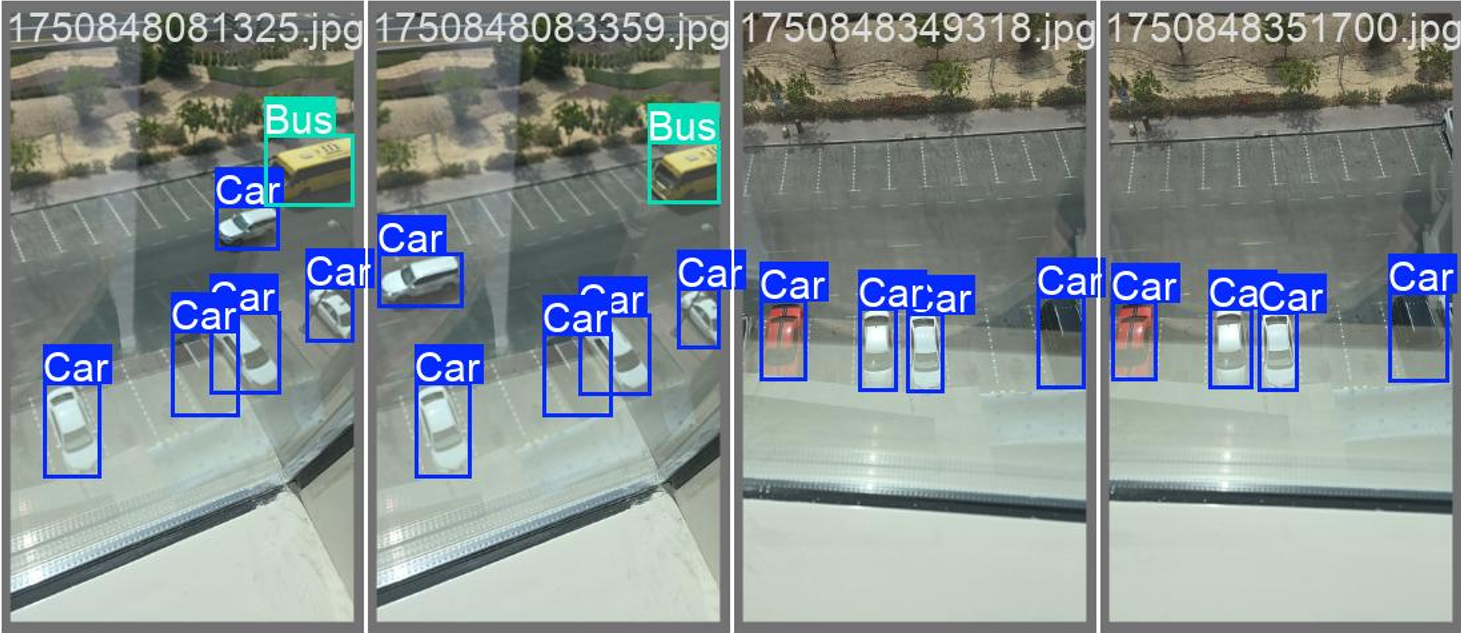
Accuracy charts summarize how reliably your checkpoint finds objects on validation data—use them alongside raw label files to decide whether a model is ready for production.

Detection accuracy metrics chart

Visual metrics make it easier to spot under-performing classes or inconsistent detections without opening every image manually. Pair this view with the exported labels in output/labels/ for a full picture.

  • Quick read on detection quality across your dataset
  • Helps validate a model before deployment or retraining
  • Complements per-image bounding-box output in output/saved/
  • Same run also produces normalized YOLO annotation files

Screens · Model comparison

Compare every checkpoint in a folder at a glance

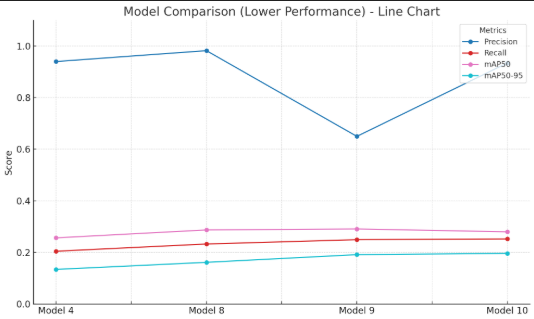
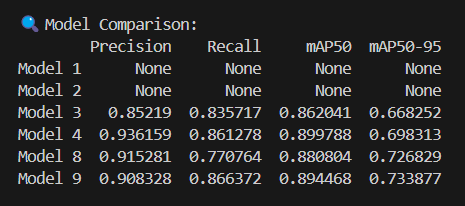
The Compare Models workflow evaluates each .pt file in a folder against validation data and exports a spreadsheet you can sort, filter, and share.

When you train several versions— best1.pt, best2.pt, best3.pt—the comparer ranks them with industry-standard metrics so you pick the winner without rerunning manual tests.

  • Precision, Recall, mAP50, and mAP50-95 per model
  • Auto-builds comparer validation paths via data.yaml
  • Results saved as output/model_comparison.csv
  • Open in Excel, pandas, or any CSV tool for analysis
Model performance comparison across multiple YOLO checkpoints

Output format

Structured artifacts you can ship

Every run writes predictable files under output/—ready for review, retraining, or spreadsheet analysis.

Images with bounding boxes

Saved in output/saved/ with detected objects, confidence scores, and class colors applied.

YOLO annotation files

Standard format in output/labels/: <class_id> <x_center> <y_center> <width> <height> with normalized 0–1 coordinates, plus classes.txt.

Model comparison CSV

output/model_comparison.csv lists Precision, Recall, mAP50, and mAP50-95 per model—open in Excel or pandas.

Dynamic features

Less configuration, more experimenting

Automatic class loading

Reads classes.txt from the model folder and wires detection classes without manual edits.

Dynamic data configuration

Creates data.yaml automatically for model comparison using classes and validation paths from your selected folder.

Error handling

Validates models, class files, and dataset folders before processing with clear messages when something is missing.

Requirements

Python stack

Python 3.13.2 recommended. Install Ultralytics YOLO, OpenCV, and pandas for comparison runs.

pip install ultralytics opencv-python pandas pyyaml

Open source · MIT License · Python CLI

Get started in four steps

Clone the repo, set up a virtual environment, organize your models and dataset, then run python main.py.

  1. Clone and create a venv

    python -m venv venv then activate: venv\Scripts\activate on Windows or source venv/bin/activate on macOS/Linux.

  2. Install dependencies

    Run pip install ultralytics opencv-python pandas pyyaml inside your activated environment.

  3. Prepare models and dataset

    Place trained weights under models/<folder>/ with classes.txt. Put images (and optional labels) in dataset/.

  4. Run the system

    With (venv) active, run python main.py and follow the interactive menu for detection or comparison.

MIT License · Built with Ultralytics YOLO · github.com/XeroDays/Supervised_learner