Windows desktop for traders

CryptoGenesis

Smarter entry and exit decisions from market cap context, profit simulation, and live order book pressure—installed on your PC, not in the browser.

  • See cap, supply, and rate for any coin on your watchlist, then work backward from a target price or from how much you plan to invest.
  • Preview profit or loss before you trade—toggle between USDT and dollar display.
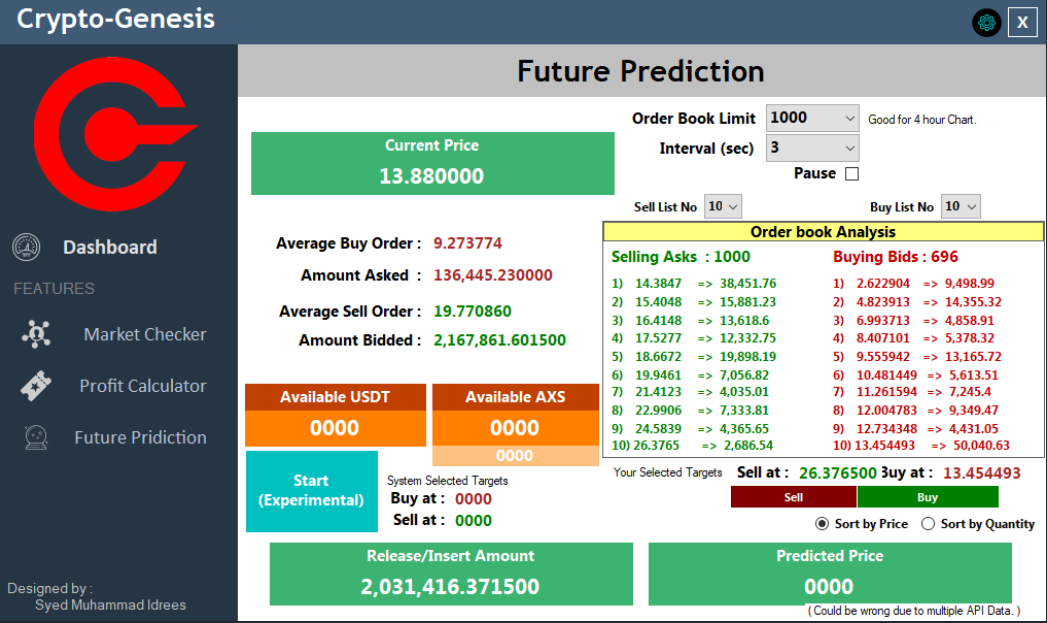
  • Spot where the book is stacked with ten clear entry and exit levels refreshed from Binance on your schedule.
CryptoGenesis dashboard showing order book entry and exit levels

Features

Everything inside the desktop app

Five focused tools in one window—built for individual traders who want clarity, not another web dashboard.

CryptoGenesis application window with market and order book panels

One workspace: cap planning, profit checks, and order book levels from a single sidebar.

Unified main window

Move between tools from a simple sidebar without opening separate apps. When you launch CryptoGenesis, you start on Market Cap Check—ready to pick a coin.
Market Cap Check

View market cap, circulating supply, and how they relate. Enter a price you are aiming for and see how much investment that implies—or enter what you plan to invest and see the price level it suggests.

Profit Calculator

Model gain or loss from your entry price, exit price, and stake size. Use the same watchlist as Market Cap Check and switch between USDT and dollar display.

Future Price Predict

Refresh Binance order book data on a timer you control. Choose how deep to read the book and see ten entry and exit levels, plus a predicted price view and balances for your pair.

Add Coin

Build a personal watchlist with the coins you actually follow. Add a name and CoinMarketCap link once—then use that coin across cap check and profit tools.

About CryptoGenesis

Desktop analysis for serious crypto traders

CryptoGenesis (Crypto-Genesis) is a Windows desktop application for studying when to enter and exit cryptocurrency positions. It pulls market cap and circulating supply context from CoinMarketCap pages you link in your watchlist, and layers Binance order book data when you need to see where size is sitting in the market.

Unlike a web platform or SaaS subscription, everything runs locally on your machine. Your coin list stays on your PC. There is no multi-user cloud account—just a focused toolkit for planning size, testing profit scenarios, and reading order book pressure in a structured way.

CryptoGenesis is research and planning software, not automated trading advice. It helps you interpret public market data; you remain responsible for every decision on the exchange.

How it works

From launch to insight in four steps

A straightforward flow—no scripts, no cloud setup required to explore the tools.

  1. Open the app

    Launch CryptoGenesis on Windows and land on Market Cap Check—the home base for picking a coin and seeing cap-related numbers.

  2. Choose a coin

    Tap a coin from your watchlist. The app refreshes market cap and circulating supply so you can plan around real fundamentals for that asset.

  3. Switch tools from the sidebar

    Jump to Profit Calculator to test a trade outcome, or open Future Price Predict to watch order book levels update on the interval you set.

  4. Grow your watchlist

    Add new coins anytime with Add Coin. They are saved on your computer and appear across the app the next time you open it—no re-entry required.

Order book insight

See where the market is leaning

Future Price Predict turns a deep Binance order book into ten readable entry and exit levels—so you spend less time squinting at raw bids and asks.

Aggregate the book

The app totals order book size across prices so you can see how much capital would move if those levels trigger.

Highlight top targets

It finds the strongest price zones by quantity—the places where professional-sized bids and asks are clustered.

Ten entry and exit points

You get ten entry levels and ten exit levels ranked in sequence, giving a structured view of where traders have already placed size.

Set how often to refresh (from once per second up to once per minute) and how deep to read the book. Pair that with your cap and supply context for a fuller picture of price pressure—not a guarantee of where the market will go next.

Benefits

Why traders use CryptoGenesis

Practical advantages from tools that work together on one desktop.

Size trades with context

Connect target prices and investment amounts to live cap and supply—so your plan reflects the asset’s scale, not just a chart pattern.

Rehearse outcomes

Check profit or loss on a scenario before you commit—helpful when comparing entries or exits on the same coin.

Read the book faster

Ten segmented levels summarize where liquidity is stacked instead of scrolling through thousands of raw rows.

Your coins, your list

Track only what you care about. Add coins once and reuse them across cap check and profit tools in the same session and later.

Use cases

When CryptoGenesis fits your day

Planning position size

You have a price in mind and want to know what investment level aligns with current cap and supply—or the reverse.

Comparing trade scenarios

You are weighing two exits or entries and want a quick profit picture before placing orders on the exchange.

Watching book pressure

You are monitoring a pair and want timed refreshes of where bids and asks are building—not a second browser tab of raw depth.

Managing a watchlist

You follow a rotating set of altcoins and need one place to store links and open them in cap and profit tools instantly.

Privacy & limitations

What to know before you rely on it

Straightforward expectations—no enterprise compliance marketing.

  • Your data stays local: Watchlists and settings live on your computer. There is no built-in cloud sync or shared team workspace.
  • Exchange access is sensitive: Connecting to Binance means handling API credentials carefully. Treat keys like passwords and follow exchange security guidance.
  • Third-party pages can change: Market cap figures come from CoinMarketCap pages you link—not a guaranteed official API—so occasional refresh issues are possible.
  • Not regulated advice: CryptoGenesis does not provide licensed financial, tax, or legal advice. Past order book patterns do not predict future prices.

Disclaimer: Cryptocurrency trading involves substantial risk. CryptoGenesis is an analysis aid only. You are responsible for your trades, API keys, and compliance with local laws and exchange terms.

FAQ

Common questions

Is CryptoGenesis a website or subscription service?

No. It is a program you install on Windows. This marketing page lives on the web; the trading tools themselves run on your desktop.

What data sources does it use?

Market cap and supply come from CoinMarketCap pages you attach to each coin in your list. Order book and price data come from Binance when you use Future Price Predict.

Do I need an account to use it?

There is no CryptoGenesis login or cloud profile. You will need your own exchange access where Binance features apply, and your watchlist is stored on your PC.

Does it place trades for me?

It is built for analysis and planning—cap math, profit previews, and order book views—not as an automated trading bot. You execute trades on the exchange yourself.

How can I get the application?

Contact Softasium via our contact page for availability, licensing, or partnership questions. A public download link is not listed on this site.

Windows desktop application

Interested in CryptoGenesis?

Bring market cap planning, profit simulation, and order book insight together on one machine. Talk to Softasium about the product, custom work, or how it fits your trading workflow.

Analysis software only—not investment advice. Requires Windows.