Google Sign-In
Sign in with your Google account and resume your session seamlessly when you return to the app.
About Expensia.ai
Expensia.ai is a personal expense tracking mobile application designed to help you manage income, spending, and account balances with clarity. Record transactions with amount, date, description, account, categories, and custom labels—then see everything reflected on a home dashboard and in full account detail views.
Whether you track cash alongside cards or want a single place for salary, bills, and day-to-day purchases, Expensia.ai is built for individuals and households who want smart financial control without complexity. New users get guided onboarding with default categories, a first account, and region-aware currency when location is allowed.
Sign in with Google and your data syncs to the cloud so you can switch devices with confidence. Profile settings include a privacy policy link and secure sign-out. Published by Softasium Software Systems. App version 1.0.0+2.
Features
From first sign-in to daily transactions—designed for mobile, synced in the cloud, and easy to trust.
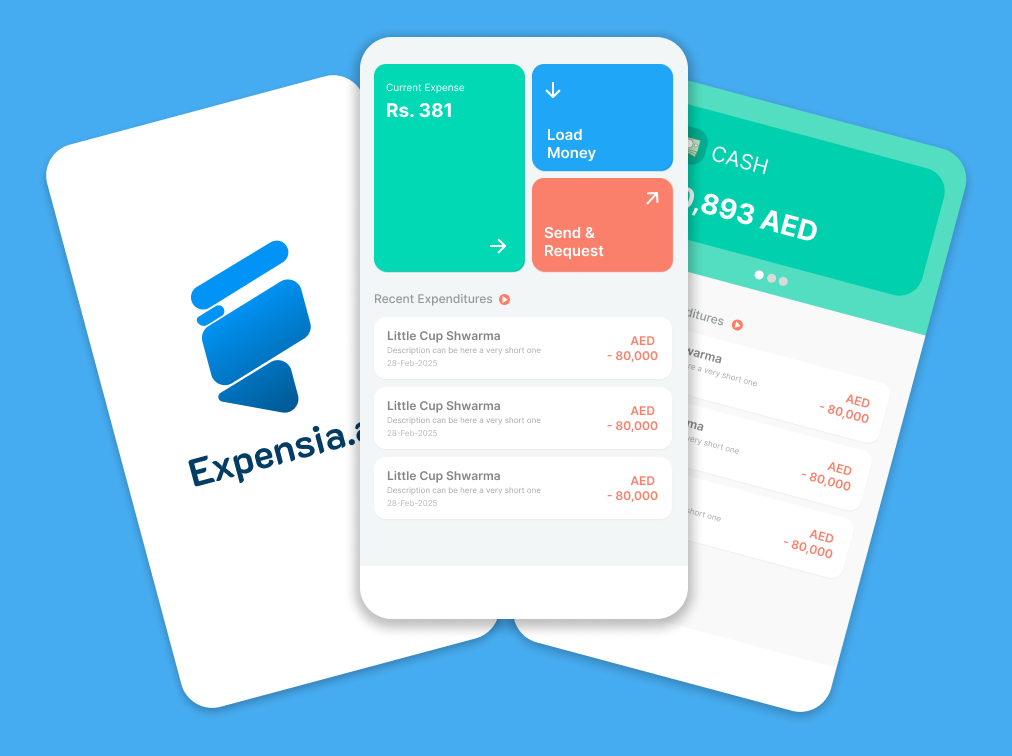
Dashboard tiles, recent expenditures, and multi-account balances—the core Expensia.ai experience on your phone.
Sign in with your Google account and resume your session seamlessly when you return to the app.
Welcome screens highlight smart financial control, expense tracking, salary and loans, and a secure wallet experience.
See total balance and recent activity on the home screen; open any account for its full transaction history. Pull to refresh.
Add income or expenses in a fast, mobile-friendly flow—like a FAB-style shortcut from your main screens.
Organize spending with default categories and your own labels so reports and history stay meaningful.
Your accounts and transactions stay backed up in the cloud so your data is there when you need it.
Access the privacy policy from your profile and sign out securely whenever you want.
Onboarding can set currency based on your region when location is allowed—so your first account feels right at home.
How it works
A simple flow designed for mobile—no spreadsheets required.
Use your Google account to sign in. Your profile and data sync to the cloud so you can use the app across sessions and devices.
Complete onboarding with default categories and your first account—such as Cash. Add more accounts anytime, each with its own balance and history.
Record income and expenses with amount, date, description, account, categories, and labels using the quick-add flow.
Check total balance and recent activity on the dashboard, drill into any account for the full list, and pull to refresh.
Built for trust
Expensia.ai is designed so you can focus on your finances—not on managing the app.
Secure cloud sync · Google sign-in · Android & iOS
Platforms
Expensia.ai is a native mobile experience built for phones and tablets on both major platforms.
Play Store and App Store links coming soon—check back or contact us for availability.
Screenshots
Swipe, use the arrows, or tap the dots below to browse app screens.


FAQ
We provide a dedicated privacy policy that explains what we collect, how we use it, and your rights. Read it at softasium.com/expensia/privacy-policy. You can also open the policy from the in-app profile.
When you sign in, your accounts and transactions sync to secure cloud storage so they are available across sessions. Sign out anytime from your profile when you are done.
Yes. Create and manage multiple accounts—such as Cash or a card—each with its own balance and full transaction history. The home dashboard shows your combined picture at a glance.
Expensia.ai includes default categories from onboarding, and you can add custom labels to organize transactions the way you think about money.
Google Sign-In is the supported way to authenticate and sync your data. It keeps sign-in simple and lets you resume your session when you return.
Pricing depends on the store listing when Expensia.ai is published. Check Google Play or the App Store for current details once links are live.
Android & iOS mobile app
Take control of personal expenses with multi-account tracking, categories, and secure cloud sync. Store listings are on the way—reach out if you would like early access.
Published by Softasium Software Systems · Version 1.0.0+2
In-app purchase shop is planned—coming in a future update.