Multi-model pipeline
Worker models propose content in parallel. A user-starred master model merges structured outputs. If merge fails, the app falls back gracefully.

How it works
From first symptom to multi-model pre-doctor analysis — a structured path designed for clarity and exploration, not cold clinical forms.
Enter your health issue, gender, age, and reasoning depth. Starting a new run resets usage totals for a fresh session.
AI generates personalized intake questions. Remove any question you don't want with the top-right X.
AI suggests lab tests and imaging. Toggle "I have this report" on each card before entering your results.
Final clarifying questions after intake and lab data are collected — no repeated questions from earlier steps.
Multiple AI models stream independent pre-doctor analyses in parallel. Compare tabs and optionally view each model's reasoning.
Features
Multi-model orchestration, configurable settings, and live transparency — built for developers and curious users who want to explore AI-assisted health intake.
Worker models propose content in parallel. A user-starred master model merges structured outputs. If merge fails, the app falls back gracefully.
Enable or disable models, star one as master, browse Free and Paid tabs with latency, throughput, and price hints.
Home dropdown: None, Low, Medium (default), High, or Very High — controls how deeply doctor models think before writing analysis.
Top-right cost and tokens pills update in real time across every screen during a run — full session transparency.
Single and multi select, sliders, dual-thumb ranges, free text, and "Other" options in a responsive card grid.
One tab per model with streaming markdown reports. Thinking bubble and collapsible reasoning panel for capable models.
Screens
Five screens, one guided flow. Each step builds on the last with AI-generated content tailored to what you've shared so far.
UI preview
UI preview
Loading questions…
UI preview
Loading laboratory tests…
UI preview
Final clarifications before analysis
UI preview
See thinking (1,240 chars) ▾
Streaming response…
Summary: Based on your reported fatigue and headache pattern…
Models
Choose which models participate in each diagnostic step. Star one master for merge operations. Enable at least one worker before starting a questionnaire run.
UI preview
Toggle which models are active for all diagnostic steps.
Star one master model for merge steps. Enable at least one worker before starting a questionnaire run. The master consolidates worker outputs into structured questionnaire and laboratory content.
Output
Each model returns a single Markdown report — a structured pre-doctor clinical analysis (not a diagnosis). Sections follow your intake, lab, and clarifying answers with cautious, evidence-weighted reasoning.
UI preview — sample output
Transparency
Totals accumulate across every AI call in your session. Starting a new run from Home resets both counters. Navigating between screens does not reset them — so you always see the full picture of what your exploration has used.
Gallery
Open NeuroAGI to a gradient desktop home screen built for focus—not clutter. Describe how you're feeling, choose your reasoning depth, and set gender and age before the guided questionnaire begins. Models and settings stay one click away; token and cost pills in the corner update live as your session progresses.
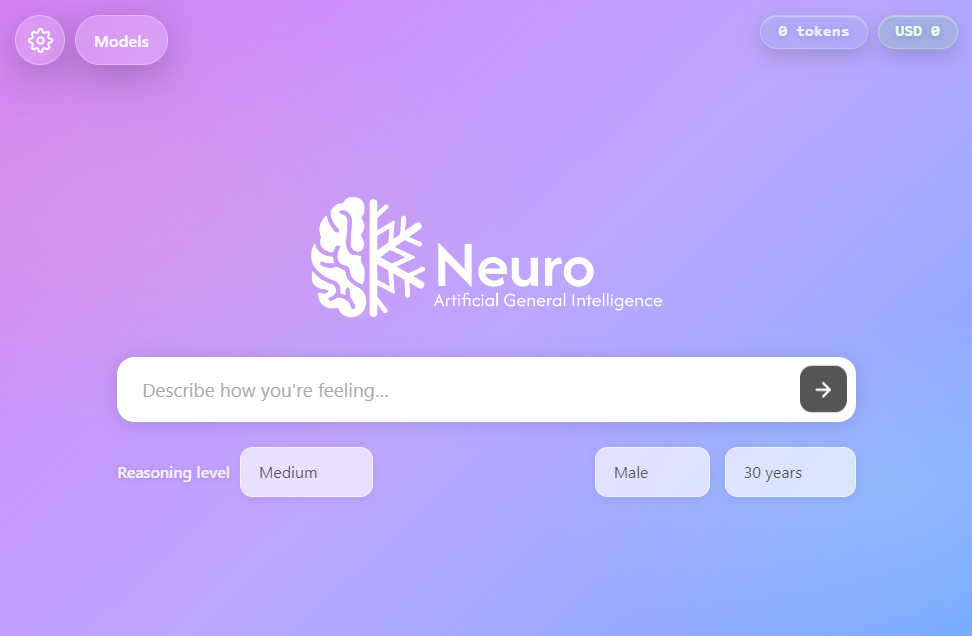
Windows desktop · Electron
NeuroAGI is an Electron desktop app for Windows. Powered by OpenRouter and available on GitHub under the MIT license.
Download NeuroAGI for Windows and run the installer.
Run the installer on your Windows machine, then launch the app.
Add your OpenRouter API key in a local environment file. Open Models on the Home screen, enable models, and star one as master.
Requirements: Windows · OpenRouter API key
Disclaimer: NeuroAGI is an experimental UI shell — not a certified medical device or clinical decision tool. It does not replace professional medical judgment. Do not use it for real patient care without appropriate validation, compliance, and oversight.
Community: Contributing · Code of Conduct · Security · Support · Changelog