Windows desktop application
Built with .NET 8 (net8.0-windows) and Windows
Forms. Launches locally on your machine—shredding never happens in a web browser.
Open source for Windows
Features
A focused Windows desktop tool for secure file and folder destruction—every capability from the application, nothing simulated in the browser.
Built with .NET 8 (net8.0-windows) and Windows
Forms. Launches locally on your machine—shredding never happens in a web browser.
Only one app window runs at a time via a named mutex. A
second launch from the context menu or CLI sends file paths to the running instance through
Win32 WM_COPYDATA messaging.
Drag-and-drop files or folders into the list, pass paths as command-line arguments, or receive them via IPC. Folders expand recursively; paths are deduplicated before shredding.
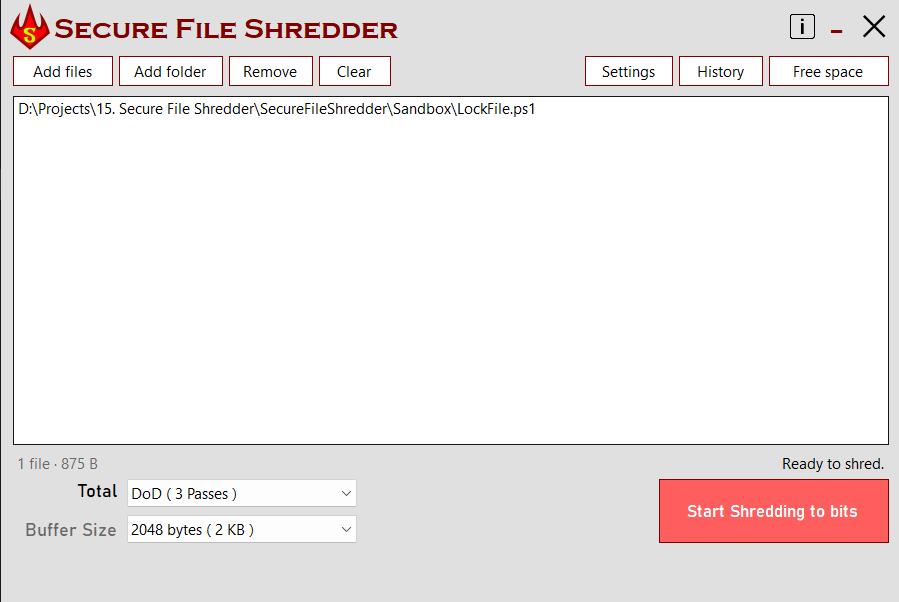
Choose pass count presets (1, 3, 7, 12, 35, or 55) and buffer size from 1 KB to 512 KB (default 4 KB). A confirmation dialog appears before any data is destroyed.
Each pass overwrites file content with bytes from
RNGCryptoServiceProvider. Pass preset labels (Normal, DoD, Gutmann, etc.)
control the number of passes only—the same random-byte algorithm runs every time.
After all overwrite passes complete, the app deletes each
file with File.Delete and removes dragged root folders with
Directory.Delete (recursive) on the UI thread.
The Inno Setup installer registers a “Shred Securely” entry on files and folders in Windows Explorer, launching the app with the selected path as an argument.
A BackgroundWorker keeps the UI responsive
during shredding. A progress bar tracks overwrite passes; closing the window cancels the
operation mid-queue.
How it works
The full user journey—from opening the app to downloading a release build.
Launch SecureFileShredder.exe directly, from a
shortcut, or with file paths as arguments. The app acquires a SecureShredder
mutex—if another instance is already running, paths are forwarded via IPC instead of
opening a second window.
Drop files or folders onto the list, use the “Shred Securely” context menu, pass CLI arguments, or let a second instance send paths over IPC. Directories are tracked and flattened recursively into individual file paths.
Select pass count and buffer size, then click Start. Confirm the warning dialog. The background worker overwrites each file with random data for the configured number of passes while the progress bar updates.
When overwriting finishes, the app deletes every queued file, then removes each root folder you dragged in. A success message appears and the queue clears.
Close the window during an active shred to cancel. The worker stops between files, shows a cancelled message, and restores the UI. Files already overwritten may still be deleted depending on where cancellation occurred.
Published GitHub releases trigger a CI pipeline: MSBuild Release, Inno Setup packaging, and upload of Secure Shredder.exe to GitHub Releases. Download the latest installer below—no build tools required.
Benefits
Practical value for privacy, security, and day-to-day operations on Windows.
Remove tax documents, medical records, or personal files before recycling a drive—without relying on cloud services.
Prepare a PC for resale or return by shredding confidential folders locally before wiping or reinstalling.
Dispose of HR, finance, or legal drafts that must not remain recoverable after a normal delete.
No external services, accounts, or network calls. Your files never leave the machine during shredding.
Inspect the source on GitHub, contribute improvements, or build from scratch—published under the MIT license.
Security & compliance
Accurate security posture based on the application’s implementation, not marketing claims.
RNGCryptoServiceProvider across the full file length in configurable buffer
chunks.
File.Delete runs. Folder removal happens only after all contained files are
processed.
net8.0-windows).
Not available for macOS or Linux.
Disclaimer: Secure File Shredder is provided “as is” under the MIT license with no warranty. While multi-pass random overwrite significantly reduces recoverability on traditional magnetic storage, no software can guarantee erasure against all forensic techniques (e.g. SSD wear-leveling, remapped sectors, or backups). Use only on files and devices you are authorized to destroy.
Use cases
Realistic scenarios where overwriting before deletion matters.
Shred scanned IDs, bank statements, or contracts stored on a local drive before decommissioning hardware.
Remove project folders and exports from a departing employee’s machine using the folder queue and context menu.
Drag an entire directory tree into the app; nested files are discovered recursively and shredded in sequence.
Integrations
No cloud services—only operating-system and build-tool integrations.
P/Invoke for window lookup, borderless form dragging, and
inter-process WM_COPYDATA file handoff between instances.
.NET cryptography API supplying unpredictable random bytes
for every overwrite pass in ShredderController.
Installer writes HKCR shell keys so Explorer shows “Shred Securely” for all files and directories.
Packages the Release build into a Windows installer
(Secure Shredder.exe) with optional desktop shortcut.
CI uploads the compiled installer when a GitHub release is published—your download source for pre-built binaries.
At a glance
Verified configuration ranges from the application source.
Screenshots
Secure File Shredder runs as a native Windows Forms app—not in your browser.
FAQ
No. Preset labels in the Total Passes dropdown only set how many overwrite passes run. Every
pass uses the same RNGCryptoServiceProvider random-byte write—the names are
shorthand for pass counts (1, 3, 7, 12, 35, or 55), not distinct byte patterns per
standard.
Windows with .NET 8 (net8.0-windows). The application is a WinForms desktop
program—not a web app. Download the installer from
GitHub Releases.
Yes. Close the window during an active operation to trigger cancellation via
BackgroundWorker.CancelAsync. The app shows a cancelled message and restores the
UI. Files already overwritten may still be deleted depending on timing.
Install using the Inno Setup installer (Secure Shredder.exe) from GitHub
Releases. The installer registers “Shred Securely” under files and folders in
Windows Explorer.
The app recursively collects every file inside the folder, overwrites each one, deletes the
files, then removes the root folder with Directory.Delete (recursive).
A second process detects the running instance via a mutex and sends the selected paths to the
existing window through Win32 IPC (WM_COPYDATA)—no duplicate windows.
Enterprise licensing is planned but not implemented yet (LicenseController is a
stub). The app is currently free and open source under the MIT license.
Windows desktop application · MIT open source
Download the pre-built Secure Shredder installer from GitHub Releases. Shredding runs locally on your PC—no sign-up, no cloud, no browser required.
Requires Windows and .NET 8. Published by Softasium Software Solutions. macOS and Linux are not supported.