Windows desktop · On-premise

Desktop On-premise v4.0.18

WheelsManager

End-to-end operations for tire retail and service shops - inventory, sales, customers, and appointments on your counter, backed by local SQL Server. Also known as Tire Shop Manager.

  • Move faster at the counter with barcode quick-scan, work orders, invoices, and service tickets tied to customers and vehicles.
  • Control tire-specific stock - new and used products, quantity history, low-stock alerts, and Excel import/export for seasonal updates.
  • Optional online catalog sync pushes eligible inventory to your Softasium Montview storefront after login - the desktop stays your system of record.
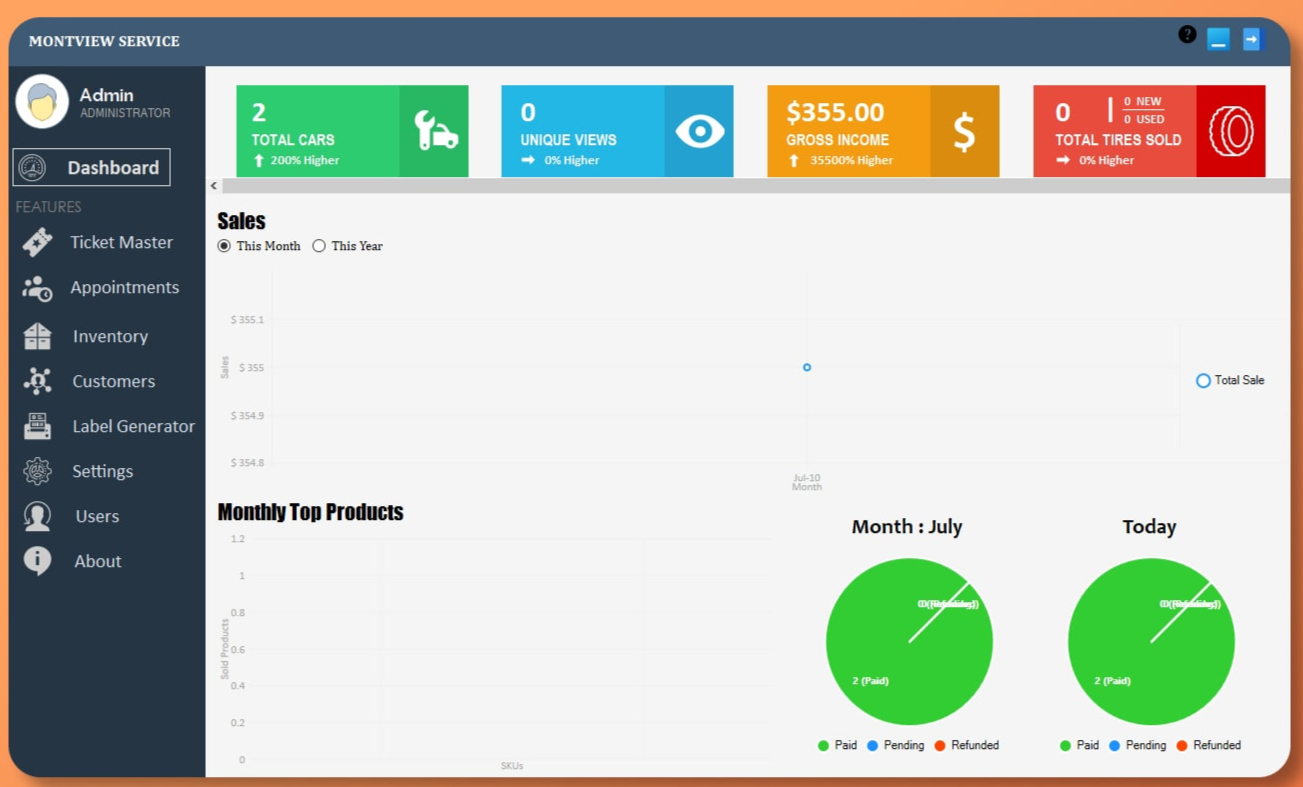
WheelsManager desktop application main window for tire shop operations

About WheelsManager

Your shop's system of record - on your own infrastructure

WheelsManager (Tire Shop Manager) is a monolithic Windows desktop application built on .NET Framework 4.8 and Windows Forms. It is designed for per-shop, on-premise deployment: each location runs its own Microsoft SQL Server database, with one or more workstations sharing that datastore across the shop floor.

Unlike a browser-based POS or generic retail tool, WheelsManager is tire-native - tracking brands and sizes, linking sales to vehicles, supporting used-inventory workflows, and giving managers role-based control over who sees what. Optional catalog sync connects eligible products to Softasium Montview e-commerce without replacing the desktop as the authoritative source for sales and stock.

This page describes the marketing solution; the application itself runs locally on Windows with no application-owned web API - just a focused shell hosting module dashboards for daily shop operations.

Features

Every module in the main shell

Twelve integrated areas cover counter work, stock, customers, scheduling, labels, insight, staff access, configuration, documents, optional web sync, and maintenance.

WheelsManager application with module navigation for tire shop operations

Module dashboards hosted in a single WinForms shell - navigate sales, inventory, customers, and more without leaving the application.

Sales & billing

Invoices, work orders, service tickets, and estimates with tire products and labor lines. Barcode quick-scan, payment methods, refunds, and soft-delete sales that automatically restore inventory.
Inventory

New and used product CRUD, stock in/out, quantity history, configurable low-stock alerts, Excel import/export, and flags for website visibility.

Customers & vehicles

Customer profiles with multiple vehicles per client, tire-position diagrams, purchase history, and customer reports linked to future sales and appointments.

Appointments

Appointment dashboard with date selection, filtering, and listing - scheduling tied directly to shop operations and the sales workflow.

Labels

Label generator and barcode printing for shelf and product labeling - select products and run a label batch from inventory.

Analytics

In-app charts for repeat customers and popular tire brands - business insight drawn from your shop data, not website traffic metrics.

Users & access

Staff account CRUD with role types and authority levels. Technicians can run in ticket-focused mode while managers retain full navigation.

Settings

Shop profile, tire brands, technicians, custom fields, terms & conditions, label headings, printer preferences, UI resolution, integration API URL, and alert thresholds.

Reports & printing

Receipts, tickets, work orders, and customer, product, and sales reports. Crystal Reports templates are mid-refactor; data preparation remains active.

Website sync

Optional post-login sync of eligible inventory to Softasium Montview e-commerce API - push and pull product visibility when production sync is enabled.

Updates & licensing

Version display, auto-update download, and remote license coordination via external update and licensing services.

Help & database setup

In-app help dashboard plus first-run SQL Server wizard, connectivity check, automatic schema migrations, and legacy data migrator for historical imports.

Workflow

How a tire shop runs its day

From first install through counter sales, stock moves, and optional catalog sync - a shop-owner view of the daily rhythm.

  1. Install & connect the database

    Run the MSI installer, select SQL Server in the setup wizard, verify connectivity, and let automatic schema migration prepare the database. Provision staff users before go-live.

  2. Sign in with the right role

    Each user logs in with role-based access. Optionally sync the website catalog after login when production sync is enabled, then land on the main dashboard.

  3. Open a sale or service ticket

    Select customer and vehicle, add tire products and labor, apply discounts, and save. Print a receipt or ticket if needed - each action is recorded in the audit log.

  4. Receive or issue stock

    Adjust inventory with stock in/out, review quantity history, and respond to low-stock awareness from configurable thresholds.

  5. Onboard customers & schedule work

    Add customers, register vehicles, and book appointments on the dashboard - linked to future sales and service visits.

  6. Print labels & bulk-update products

    Run barcode label batches from inventory, or import and export product data in Excel for seasonal sheet updates from suppliers.

  7. Sync eligible catalog items (optional)

    Mark products for online display; after login, sync pushes eligible SKUs to your connected Montview storefront without making the web layer your system of record.

  8. Correct mistakes & sign out

    Soft-delete a sale to roll back inventory transactionally. Update shop branding and thresholds in Settings. Log out to clear the session when the day ends.

Benefits

Outcomes shop owners care about

Replace disconnected spreadsheets and generic POS tools with tire-specific workflows on infrastructure you control.

Faster counter throughput

Barcode scan, quick tickets, and customer-vehicle lookup keep lines moving without re-keying the same data.

Accurate tire stock

New and used inventory with history trails and low-stock alerts—so bays are not waiting on sizes you thought were on the shelf.

Vehicle-linked service history

Multiple vehicles per customer with tire-position context— better recommendations and fewer repeated questions at check-in.

Role-based staff control

Technicians focus on tickets; managers retain full access. Authority levels restrict navigation where appropriate.

Optional online catalog

Expose selected SKUs to Montview e-commerce without abandoning the desktop as the authoritative sales and inventory system.

Operational traceability

Database audit logs and diagnostic file logs support dispute resolution, support calls, and internal accountability.

Architecture

On-premise deployment you own

Single-shop model: multiple desktops can share one SQL Server instance. This is not a cloud-native SaaS replacement.

Entity Framework 6 · shop settings in database · workstation prefs under Documents\TireShop

Per-shop database

One SQL Server database typical per location—Windows integrated or SQL authentication.

Shared workstations

Several desktops on the LAN can connect to the same server; default list pagination size is 200 records.

Background workers

Sync, audit, and import tasks run in background workers without blocking counter UI responsiveness.

Integrations

Connections that extend the desktop

Outbound integrations and deployment tooling—WheelsManager does not host a public API for third parties.

Softasium Montview e-commerce

Configurable base URL in Settings. Post-login sync pushes and pulls product visibility for SKUs flagged for website display—production-gated.

Excel import & export

Bulk product updates from supplier sheets or seasonal price changes without manual one-by-one entry.

MSI deployment

Production rollouts via Advanced Installer MSI—standard Windows deployment for IT teams managing shop workstations.

Licensing & updates

Remote license coordination and auto-update delivery via external VersionSubnet and Skysol NQVault HTTP services.

Use cases

Built for real tire shop personas

Independent tire dealer

One location, one database, counter staff who need fast tickets and reliable stock counts without enterprise IT overhead.

Multi-bay service center

Technicians in ticket-focused mode while service managers run full sales, appointments, and reporting from the same SQL Server.

Used-tire specialist

Separate new and used product workflows, quantity history, and labeling for SKUs that do not fit generic retail POS categories.

Shop with a small e-commerce storefront

Keep the desktop as system of record while selectively syncing eligible inventory to Montview for online discovery.

Security & compliance

How WheelsManager handles access and data

Factual behavior for IT evaluators-no certification claims beyond what your deployment controls provide.

  • Authentication: Username and password validated against SQL users with a password recovery flow. Limit admin accounts and enforce strong account hygiene.
  • Password storage: MD5 hashing at login. Plan upgrades with your vendor for modern hashing on new deployments.
  • Authorization: Integer authority on user types. Lower authority restricts UI to ticket-focused mode for technicians; managers retain broader navigation.
  • Network: HTTPS for external APIs; enable SQL Server TLS when the database is remote. Apply standard enterprise database hardening.
  • Secrets: API authentication uses application salt and device identity. Protect deployment images and use environment-specific credentials.
  • Local data: Config, images, and logs on workstation disk under the user Documents folder. Use disk encryption and endpoint policies.
  • Audit: Database system log for user actions plus file logs for diagnostics-operational traceability for disputes and support.

Reporting status

Print workflows and report templates

Receipts, tickets, work orders, and operational reports are actively supported—data preparation for printing is live in the application. Crystal Reports templates are currently mid-refactor as part of ongoing maintenance.

If your shop relies on specific print layouts, validate receipt, ticket, and report workflows after each upgrade. Contact Softasium support if you need guidance on template status for your deployment version.

Download

Application & prerequisites

Install WheelsManager and required runtimes on each workstation. SQL Server is typically installed once per shop location.

WheelsManager Program (Client)

Download WheelsManager Program (Client)

Version: 4.0.18 · Windows MSI installer

SQL Server 2017 Express Edition (English)

64-bit download 275 MB

SAP Crystal Report Runtimes

Version: 13.0.32.4286

Microsoft Visual C++ Redistributables

Visual C++ 2005 Service Pack 1 Redistributable Package ATL

Visual C++ 2005 Service Pack 1 Redistributable Package MFC

Visual C++ Redistribution for Visual Studio 2015

Windows desktop · On-premise tire shop operations

Ready to modernize your tire shop?

WheelsManager brings counter speed, tire-specific inventory, and optional online catalog sync together on infrastructure you control. Talk to Softasium about licensing, deployment, or how the platform fits your shop.

Requires Windows, SQL Server, and listed runtimes. Not a browser-based SaaS replacement.